
Niche Finder AI Chrome Extension for Niche Research
Stop guessing search intent and battling industry giants. Discover how to find winning keywords directly inside your Google search results.
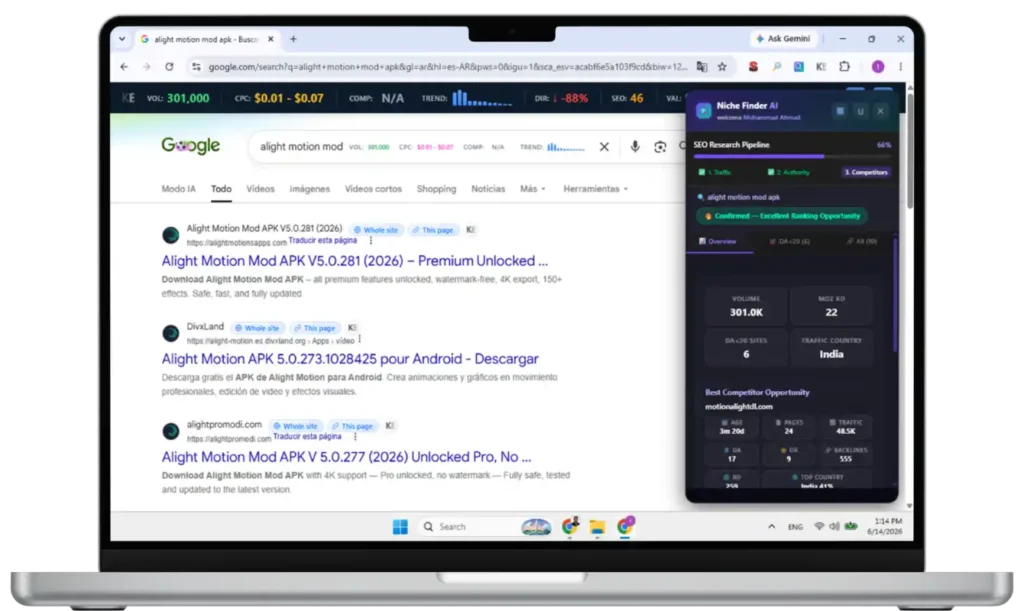
Finding the right keywords often feels like digging for gold with a plastic spoon. You spend hours analyzing search volume, guessing search intent, and organizing massive spreadsheets, only to realize the top Google rankings are dominated by high-authority giants.
If you want to drive organic traffic without competing against industry behemoths, you need a smarter workflow. Enter the Niche Finder AI Chrome extension—an intuitive tool designed to bring advanced SEO metrics directly to your search results.
What is the Niche Finder AI Chrome Extension?
The Niche Finder AI Chrome Extension is an AI keyword research software that integrates directly into your browser. It helps digital marketers, bloggers, and affiliate marketers uncover low-competition keywords, analyze Google SERPs, and evaluate SEO competition instantly without leaving the search page.
By layering critical data over your standard Google search, this extension transforms everyday browsing into a powerful SEO automation engine.
Why Traditional Keyword Research is Holding You Back
As someone who spends hours deep in the SEO trenches, you know that traditional keyword research is fragmented.
The old workflow usually involves opening Google, entering a query, guessing the search intent, and then copying URLs into a separate SERP analysis tool to check Domain Authority (DA) and backlinks. This constant context-switching kills productivity.
To build true topical authority and execute a winning content strategy, you need data at the point of action. Niche Finder AI solves this by injecting real-time intelligence directly into the Google SERP.
Key Features of Niche Finder AI Extension
1. On-SERP Seamless Interface
- No Context Switching: The extension injects a clean, modern side-panel directly into the Google Search Results Page (SERP). You don’t have to leave Google or open a separate web app to do your keyword research.
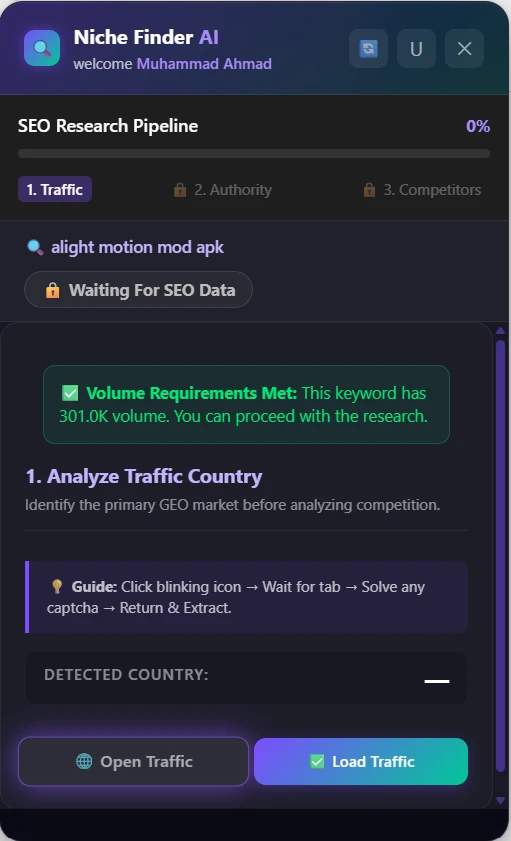
- Step-by-Step Guided Workflow: Features an intuitive 3-step wizard (Traffic Country, SERP Authority, AI Analysis) that guides users exactly through the keyword validation process without overwhelming them.
2. Intelligent GEO & Traffic Localization
- Live Traffic Origin Detection: It automatically scrapes and detects the primary country where the traffic for a specific keyword originates.
- One-Click SERP Localization: Instead of manually using VPNs or changing browser settings, a single click reloads the Google SERP specifically localized to the target country (e.g., adding the
&gl=usparameter), ensuring the competition data you see is 100% accurate for that region.
3. Use KWS Everywhere to find Volume
- Search Volume Extraction: Seamlessly integrates with the KWS Everywhere extension to pull in accurate monthly search volumes directly from the SERP.
- Minimum Volume 40,000: Automatically blocks you from wasting time on low-value keywords by strictly enforcing a minimum search volume requirement 40,000 before allowing competition analysis.
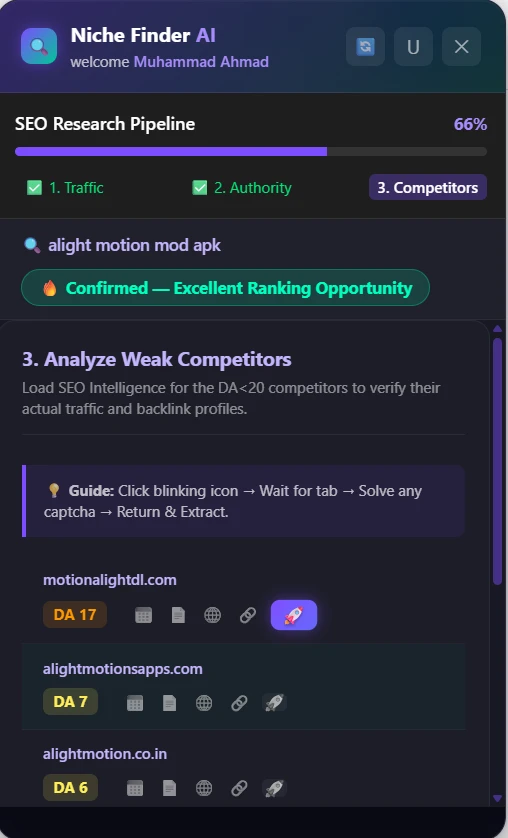
4. Smart Competitor Authority Analysis
- Moz Domain Authority (DA) Extraction: Automatically connects to Moz to extract the Domain Authority for the top ranking sites on page one.
- Weak Spot Highlighting: Automatically scans the top 10 results and visually highlights “Weak Competitors” (e.g., sites with a DA under 20). If low-DA sites are ranking, it flags the keyword as an easy target.
- Automated Session Management: Features “silent” background verification of your Moz login status to ensure the data pipelines work smoothly without throwing errors.
5. AI-Driven Report
- Real-time AI Verdict: Show the combined data (Search Volume, Keyword, Country, Competitor DAs, and specific competitor URLs)
- Actionable Reporting: The AI returns a final verdict on whether the keyword is “Easy”, “Medium”, or “Hard”, accompanied by strategic recommendations on exactly what kind of content needs to be written to outrank the current top 10.
6. Built-in Safeguards & Smart Caching
- Google Personalization Warnings: Detects and warns you if Google personalization is active, recommending Incognito mode or a clean SERP to prevent skewed research data.
- Local Caching: Remembers the state of your workflow and the data you’ve scraped for a keyword. If you accidentally close the tab or reload, your progress and data are instantly restored from local storage.
- Smart Retry Mechanics: Includes visual blinking indicators for next actions, toast notifications for success/errors, and fallback recovery buttons if a connection to Moz or Ahrefs fails.
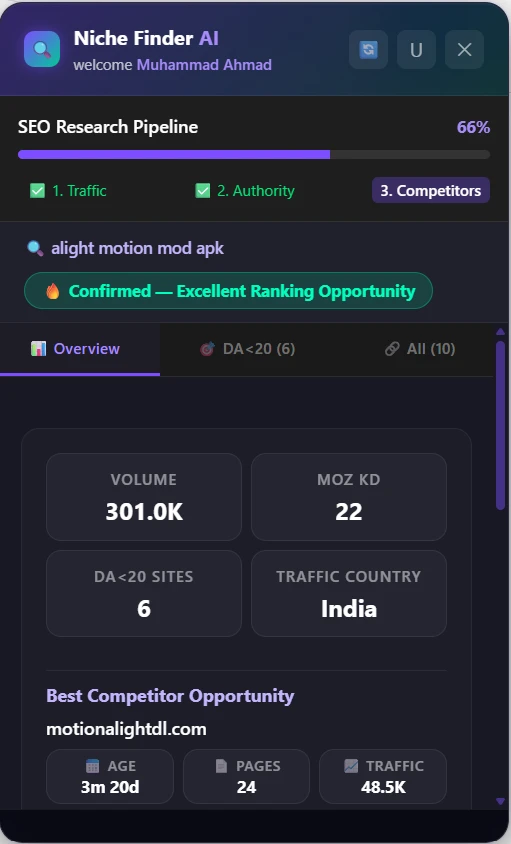
How System Choose Final Results
1. 🔥 Confirmed — Excellent Ranking Opportunity
This is the highest possible rating, indicating an extremely weak SERP where you can likely rank with a brand new website.
- The Logic: The overall Keyword Difficulty (KD) must be less than 20, at least 3 sites less than 20 DA on SERP and 1 site less than 5 DA in top 5.
2. ✅ Confirmed — Easy to Rank
This indicates a highly favorable SERP where you have a strong chance of ranking with decent content and minimal backlink effort.
- The Logic: This triggers under two conditions:
- KD is 30 or lower, AND there is at least one site with DA < 10 on Page 1, AND at least two sites with DA < 20 on Page 1.
- OR KD is between 31 and 40, AND there is at least one site with DA < 10 on Page 1, AND at least two sites with DA < 20 on Page 1.
3. 🟡 Confirmed — Requires SEO Effort
This indicates the niche is penetrable, but you will likely need to build a few high-quality backlinks and have strong on-page SEO to break into the top spots.
- The Logic: The KD is between 41 and 50, but there are still clear weaknesses (at least one site with DA < 10 on Page 1, AND at least two sites with DA < 20 on Page 1).
4. 🟠 Confirmed — Competitive but Possible
This implies a tough niche. You can rank, but it will require time, domain age, and a consistent backlink strategy.
- The Logic: The KD is between 51 and 55, but there are still some lingering weak spots (at least one site with DA < 10 on Page 1, AND at least two sites with DA < 20 on Page 1).
5. ❌ Not Recommended for Fast Ranking
This is the warning tier. The AI actively discourages targeting this keyword if you are looking for quick traffic, as the SERP is dominated by high-authority authority sites (like Wikipedia, Forbes, Amazon, etc.).
- The Logic: The SERP does not meet any of the vulnerability criteria listed above, or the KD is above 55 without enough weak competitors.
6. 🔒 Waiting For SEO Data
This is the default or “Locked” state.
- The Logic: This shows up if the workflow is incomplete (e.g., the user hasn’t completed Step 1 to load the Traffic Country, or hasn’t completed Step 2 to pull the Moz DA metrics).